
一句话版 浏览器智能体有一个“失忆症”问题。它们每次运行都会从零重新摸索站点,反复支付完整的探索成本。Autobrowse 的解决办法是:让智能体围绕一个真实任务不断迭代,直到方法收敛,然后把胜出的做法提升为一个可复用、可长期保存的技能。这个技能就成了“记忆”,下一个智能体、队友或客户都可以直接拿来用,不必再把已经学会的东西重新学一遍。
特别感谢 @\_shubhankar 在内部做出了 Autobrowse,并协助完成这篇文章。
没有海马体的天才
如果你已经把浏览器智能体真正上线到生产环境,你一定很熟悉这个问题的轮廓。
它第一次跑一个新站点时会让人兴奋。智能体到处探索,理解页面,最终完成任务。第二次运行看起来几乎一模一样。等到第一百次运行时,事情就变得让人沮丧了。你已经为同样的探索付费了一百次,成本曲线只会笔直上升,但你依然没有一个足够干净的产物,能直接交给队友并说“这就是我们做这件事的方法”。
真实的网站都很混乱。它们会针对不同的 user agent 渲染出不同结果,会把内容藏在 JavaScript 后面,会把真正有价值的数据塞进一个没有文档的 JSON 接口里,会在不认识当前会话时甩出验证码,甚至可能在某个周二就把整条流程重新设计一遍。通用智能体循环可以在当下流畅应对这些情况,但 session 一结束,它又会把一切忘光。周一解决掉的问题,连同那次 session 一起蒸发了。
浏览器智能体在生产环境里的真正瓶颈,是一种人类和智能体都能读懂、也都能信任的“记忆”。推理本身已经不再是约束。
什么是Autobrowse?
Autobrowse是一种“用 AI 改进 AI”的工作流。你给智能体一个真实站点上的真实任务,它从头到尾跑完整个任务,研究自己留下来的 trace,调整策略,然后持续迭代,直到整个流程不再只是“碰巧成功”,而是真正变得可靠。等它收敛之后,就会把那套胜出的做法沉淀成一个可复用的技能:一个 markdown 文件,再加上完成该任务所需的确定性粘合层,比如 CLI 调用、fetch、selector、辅助脚本等。
这和 Karpathy 的 autoresearch harness 有些相似,只不过它服务的是“更快、更便宜地学会浏览器技能”这件事。第一次运行之所以故意昂贵,是因为它要替后面所有运行把学费先交掉。
真正的重点就是这个产物本身。每一次 Autobrowse 运行,都会产出一个持久存在的 markdown 文件。未来的任何智能体都可以直接加载并执行它,而不只是复用这一次运行本身带来的结果。
它是怎么工作的:
学习闭环:
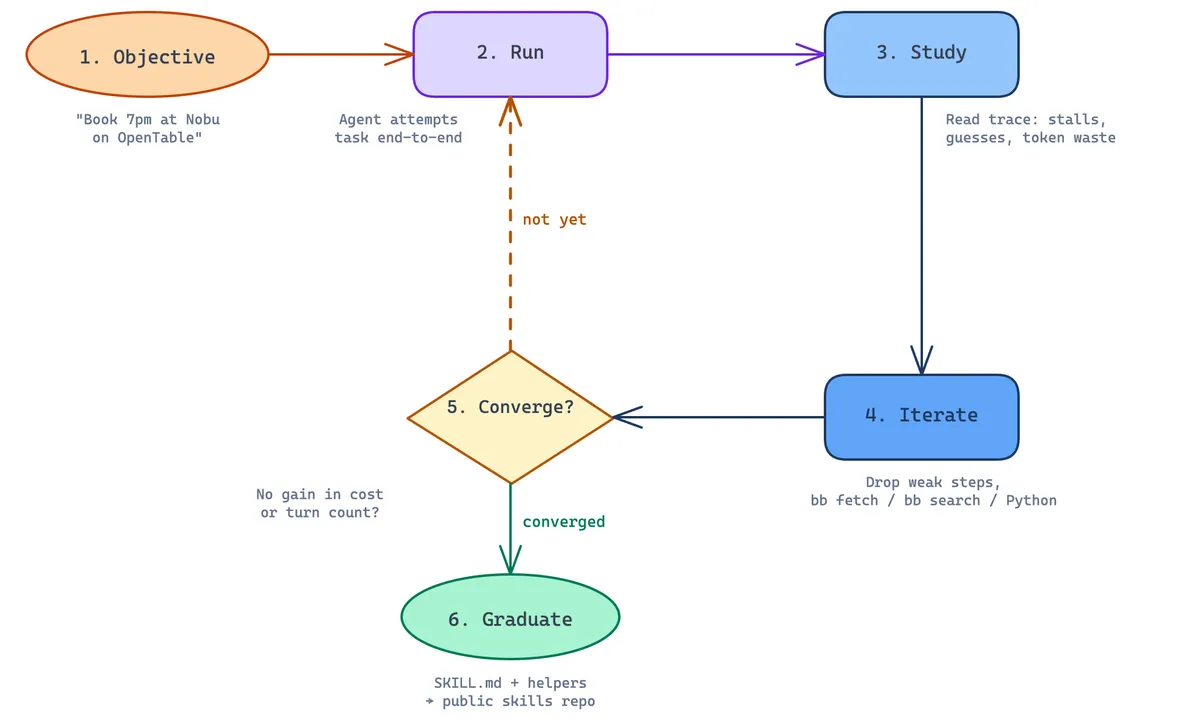
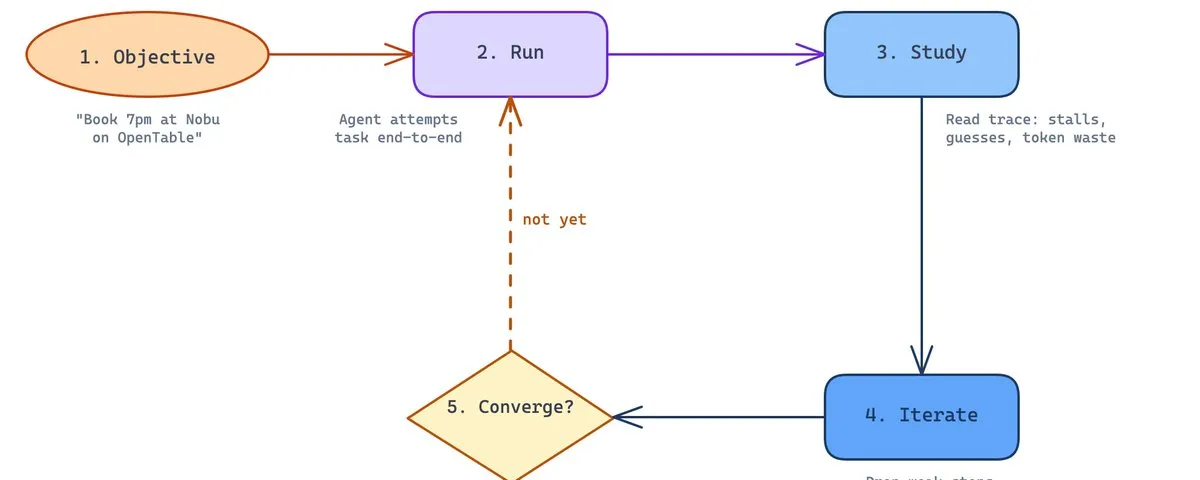
核心循环其实很简单:
- 目标。 给智能体一个真实站点上的真实任务,比如“在 OpenTable 上帮我订这家餐厅晚上 7 点的晚餐位”。
- 运行。 让智能体在真实浏览器里从头到尾尝试完成这个任务。
- 复盘。 智能体读取自己的 trace。它卡在了哪里?猜测发生在了哪里?哪些 token 花得没有必要?
- 策略。 这轮运行的“外循环”会维护一个
strategy.md文件,本质上就是一个草稿本,智能体会在每次迭代后把观察记进去:什么有效、什么失效、下一步该试什么、哪些做法该停掉。到下一轮迭代时,智能体会先读strategy.md,把它作为上下文来继续推进,于是改进会不断累积,而不是每次运行都重新归零。 - 迭代。 基于这些笔记继续调整策略。把没有贡献的步骤删掉。尽可能依赖确定性更强的 helper,比如
browse fetch、browse search、自定义 Python 等。 - 收敛。 一旦连续几轮迭代在成本或轮次数上都不再带来明显改善,就提前停止。
- 毕业。 把
SKILL.md和相关 helper 文件一起写进公共 skills 仓库。
在实际使用里,我们会把迭代次数压得比较低,大约 3 到 5 轮,而且会非常积极地提前停止。目标不是理论上的全局最优,而是一条足够可靠、足够便宜、可以反复复用的路径。
输出是什么?
最终产出的是一个很小、可读性很强的文件。不是 transcript,不是一串 embeddings,也不是一卷截图回放。就是 markdown 而已,扫一眼大概像这样:
---
name: "craigslist-search-listings"
title: "Craigslist Search Listings"
description: "Search Craigslist in a given city and category for listings matching a query, returning each listing's title, price, location, posting date, and listing URL."
website: "craigslist.org"
category: "marketplace"
tags: ["craigslist", "marketplace", "listings", "search"]
status: "autobrowsed-run-004 + prod-validated-002"
source: "autobrowse + browser-trace · 4 iters · converged 2026-04-30 · cross-region prod validation 2026-05-01 (NY/SF/Boston, cta+apa) · postal-override discovery 2026-05-01 (Chicago/NYC, mca+apa)"
updated: "2026-05-01"
recommended_method: "api"
alternative_methods:
  - method: "browser"
    rationale: "When the JSON API is rate-limited or blocked (rare — no auth or anti-bot today), fall back to browsing the city subdomain's /search/{category} page and extracting listings from the rendered text + anchor hrefs."
---

# Craigslist Search Listings — Browser Skill

## Purpose

Return a list of Craigslist postings matching a query in a given city and category — title, price, location, posting time, lat/lon, posting ID, and canonical listing URL. Read-only; never posts or edits.

## When to Use

- Daily / hourly monitoring of new listings matching a query.
- Bulk extraction across multiple cities or categories.
- Anywhere you'd otherwise scrape Craigslist HTML — the API is faster, cheaper, and structurally more reliable.

## Workflow

The Craigslist web UI is a thin client over a public JSON API at `https://sapi.craigslist.org` — no auth, cookies, session state, or anti-bot stealth. Send a `Referer` header matching the target city subdomain; if your outbound IP is in a different region than the target city, add `postal=&search_distance=` to the query — the API geo-scopes by IP only when no `postal` is supplied (see the gotcha below). **A residential proxy is not required.** Lead with the API path; the browser path works as a fallback but pays a ~100× cost premium because the search page is fully JS-rendered (`browse snapshot` returns 0 a11y refs and harvesting per-listing URLs costs ~3 turns each).

1. **Pick city + category** (and optionally subarea). City is the Craigslist subdomain (`sfbay`, `newyork`, `losangeles`, `seattle`, ...). Category is the search-path abbreviation (`sss` for-sale-all, `cta` cars+trucks, `apa` apartments, `ggg` for-sale-by-owner, etc.). To scope to a specific subarea (city-within-region), prefix the category in `searchPath` — e.g. `searchPath=sfc/apa` for SF-proper apartments, `searchPath=eby/cta` for East Bay cars. Subarea codes are listed in each response's `data.decode.locations[i][2]`. Subarea-scoping is significantly more efficient than fetching region-wide and filtering client-side (e.g. `apa` returns 9,798 bay-wide vs. 253 for `sfc/apa`).

2. **First page**:

GET https://sapi.craigslist.org/web/v8/postings/search/full

?searchPath={cat}

&query={q}

&sort={date|rel|priceasc|pricedsc}

&batch=1-0-360-1-0

&lang=en&cc=us

Referer: https://{city}.[craigslist.org/](http://craigslist.org/)

   Returns JSON with `data.totalResultCount`, `data.items[]`, and decode tables under `data.decode`. Confirm the response is scoped to the right region via `data.areas` (e.g. `{"1": {"name": "newyork"}}`) — if it shows the wrong city, add `postal=&search_distance=` (any ZIP in the target metro) to override the IP-based geo-scope.

   **Common filter params** (append as query args; check `data.humanReadableParams` to confirm acceptance): `min_price`, `max_price`, `min_bedrooms`, `max_bedrooms`, `min_bathrooms`, `bundleDuplicates=1`, `hasPic=1`, `postal=`, `search_distance=`, `availabilityMode=available`, `auto_make_model=`, `min_auto_year`/`max_auto_year`, `min_auto_miles`/`max_auto_miles`. Unrecognized params are silently dropped.

3. **Decode each item**. `data.items[]` is an array of positional arrays. **Critical: many fields are offsets / lookup keys, not absolute values** — always read against `data.decode.*`:
   - `item[0]` — `postingIdOffset`. Absolute id = `data.decode.minPostingId + item[0]`.
   - `item[1]` — `postedDateOffset` (seconds). Absolute epoch = `data.decode.minPostedDate + item[1]`.
   - `item[2]` — `categoryId` (integer). Maps to a 3-letter sub-category abbreviation (`cat3`) used in canonical URLs. The mapping is **not** in the response — it's a fixed Craigslist enum. Observed during iter-2 verification: `68 → bik` (bicycles), `93 → spo` (sporting goods), `122 → pts` (parts), `197 → bop` (bicycle parts/accessories). Other categories will need to be back-derived from the `data.decode` block or a click-through verification.
   - `item[3]` — price as integer (0 or missing for free items).
   - `item[4]` — `"locIdx:hoodDescIdx:hoodIdx~lat~lon"`. Look up `data.decode.locations[locIdx]` → `[1, city, subareaAbbr]`; `data.decode.locationDescriptions[hoodDescIdx]` → display location string; parse `lat~lon` for coordinates.
   - **Title** — last array element that is a plain string (i.e. not a tagged `[code, ...]` block). For `cta` (cars+trucks) this is `item[-1]`. For `apa` (apartments) and other housing categories, a trailing `[5, beds, sqft]` housing-meta block pushes the title earlier — iterate from the end and take the first plain string.
   - Tagged blocks `[code, value]` mid-array: `code === 5` is `[beds, sqft]` (housing categories); `code === 6` is the URL slug; `code === 10` is the formatted price string ("$1,350"); other codes carry image refs and metadata.

4. **Construct canonical post URL**:

https://{city}.[craigslist.org/{subareaAbbr}/{cat3}/d/{slug}/{postingId}.html](http://craigslist.org/{subareaAbbr}/{cat3}/d/{slug}/{postingId}.html)

   - `postingId` from step 3 (offset + minPostingId)
   - `subareaAbbr` from `data.decode.locations[locIdx][2]` (e.g. `nby`, `sby`, `sfc`, `eby`, `pen`)
   - `cat3` from the categoryId enum (step 3)
   - `slug` from the `[6, ...]` tagged block

   **Wrong `cat3` will 404**. If you don't know the mapping for a categoryId, fall back to `https://{city}.craigslist.org/search/{cat}?postingId={postingId}` which redirects to the canonical URL.

5. **Paginate** (only if results > 360):

GET https://sapi.craigslist.org/web/v8/postings/search/batch

?batch=1-{OFFSET}-1080-1-0-{startTs}-{endTs}

&cacheId={cacheId from step 2}

Referer: https://{city}.[craigslist.org/](http://craigslist.org/)

   Increment `OFFSET` in steps of 1080. `startTs`/`endTs` are the `data.cacheTs` and current epoch.

## Site-Specific Gotchas

- **Geo-redirect on bare domain**: `https://www.craigslist.org/` redirects to a city based on the request IP (in our trace, `provo.craigslist.org`). Always open `{city}.craigslist.org` directly.
- **API geolocates by request IP — `postal=&search_distance=` overrides it**: No auth, no cookies, no anti-bot — but if no `postal` is supplied, the API scopes results to the city corresponding to the request's source IP, not the `Referer` header (e.g. a NY query from an SF IP silently returns `{"1": {"name": "sfbay"}}` results). Adding `postal=` for any ZIP in the target metro plus `search_distance=` forces the result set to that region. Verified 2026-05-01 with direct curl from an SF IP returning correct Chicago (`postal=60601&search_distance=50`, 0.21s, 41 results) and NYC (`postal=10001&search_distance=10`, 2.19s, 475 results) listings. **A residential proxy is not required** — `bb fetch --proxies` *without* `postal` is also geo-locked to sfbay (proxy doesn't change the source-IP region for this API), and adding `postal` to a direct curl is ~8× faster than the proxy path (0.21s vs 1.63s on the same Chicago query). Always verify scope via `data.areas` in the response.
- **Snapshot returns 0 refs on `/search/`**: The search page is fully JS-rendered. Don't use `browse snapshot`/`click` to enumerate listings.
- **Compact response format**: `data.items[]` uses positional arrays + `data.decode.*` lookup tables to keep the response small. Don't expect named fields per item — decode by position.
- **Pagination batch sizes**: First page is ~360 (`batch=1-0-360-1-0`); subsequent batches are 1080 each (`batch=1-OFFSET-1080-1-0`).
- **Free items have no price**: `item[3]` may be `0` or absent.
- **Posting time precision**: The rendered page shows relative ("< 1 hr ago"); absolute epoch = `data.decode.minPostedDate + item[1]`.
- **`item[0]` is NOT the postingId** — it's an offset from `data.decode.minPostingId`. Naïvely treating `item[0]` as the postingId produces 404s.
- **`data.decode.locations` indexing is per-response, not stable.** Iter-3 saw `locations[1] → ["sfbay","sfc"]`; iter-4 saw `locations[1] → ["sfbay","eby"]` for the same city/query. The decode block is rebuilt per cache TTL — **always look up `locations[locIdx]` from the response in hand**, never cache or hardcode the table.
- **Neighborhood labels are unreliable**: `data.decode.locationDescriptions` varies per response and per category. The same neighborhood may appear under different label-table indices across responses, may be missing in some categories (e.g. "Russian Hill" shows up in `apa` but is absent from `cta` decode tables), and is sometimes replaced by a generic city-level label by the poster. For neighborhood-scoped searches, use **lat/lon bounding-box matching** on `item[4]`'s coordinates as a fallback or supplement to label-string matching. Example bbox for North Beach + Russian Hill: `lat 37.794–37.810, lon -122.425 to -122.404`.
- **Categories are an undocumented enum** — the response decode tables don't include the `categoryId → cat3` mapping; observed values across iters: `68→bik, 93→spo, 101→foa, 122→pts, 197→bop, 5→fua` (and likely many more for non-bicycle queries). The redirect URL `https://{city}.craigslist.org/search/{cat}?postingId={id}` is the safest fallback when an unknown categoryId is encountered.
- **Rate-limit self-imposed**: No formal block but Craigslist throttles aggressive burst traffic, so the skill uses modest pacing rather than trying to maximize raw QPS.
如果智能体发现了某个没有公开文档的 JSON 接口,它就会被写进这里。如果某个表单在提交前需要额外等一下,这种信息也会被写进去。如果某个领域专属 helper 比如 helpers/amazon.py、helpers/opentable.py、helpers/sf-portal.py 值得保留下来,它也会和这个技能一起提交到仓库里。
这和我们在内部的通用智能体 bb 里采用的是同一种形态。我们在这篇《我们如何在 Browserbase 构建智能体》里写过:内部所有工作流,不管是功能请求、session 排查、PR,还是销售线索分流,都是通过同一个智能体来跑的,只是在需要时按需加载小型 markdown 技能。通用循环本身保持简单;领域知识则放在技能里,这样它就可以被阅读、编辑、版本化和复用。
Autobrowse 把这个思路又往前推了一层:智能体会通过亲自完成任务,给自己写出技能。
browse 里的手写技能,以及公共 Browse CLI 生态中由 Autobrowse“毕业”出来的技能,本质上都属于同一种产物。只要技能一旦存在,智能体在加载和执行它时,根本不关心它到底是人写的,还是另一个智能体写的。
它擅长什么?
Autobrowse 在那些确实需要探索的网站上表现尤其出色。
- 隐藏或没有文档的 API。页面渲染层看不见,但在网络流量里能抓到。
- 重度客户端渲染。真正的内容只有完成一连串交互之后才会出现。
- 多步骤登录或向导式流程。从第一屏很难直接看出正确路径。
- 任何复杂 UI。可靠的最短路径足够不直观,以至于人类手动逆向可能都要花上几个小时。
- 节省 token 的机会。比如循环里某些步骤本来就是冗余的,像 UI 没有实质变化时就没必要反复
browse screenshot。
比如我们曾经用 Autobrowse 去摸一个联邦资助项目门户,最后找出了一个没有公开文档的 JSON 接口,只靠一次调用就能拿到当前所有 grant。原本看起来像是要抓 28 页的数据,最后收缩成了一次 browse fetch。而这个发现现在已经固化进“毕业”后的技能里,我们以后再也不用重新把它找一遍。
这也是让整套方法值得长期投入的重复性模式:智能体会去尝试人不会去试的东西,也会发现人类根本看不到的东西。
一个具体基准:Craigslist
到目前为止,我们内部拿出来分享过的一个清晰基准,就是 Craigslist。
传统Claude Code循环:约 0.22 美元,约 71 秒
渐进式自动浏览技能:约 0.12 美元,27 秒
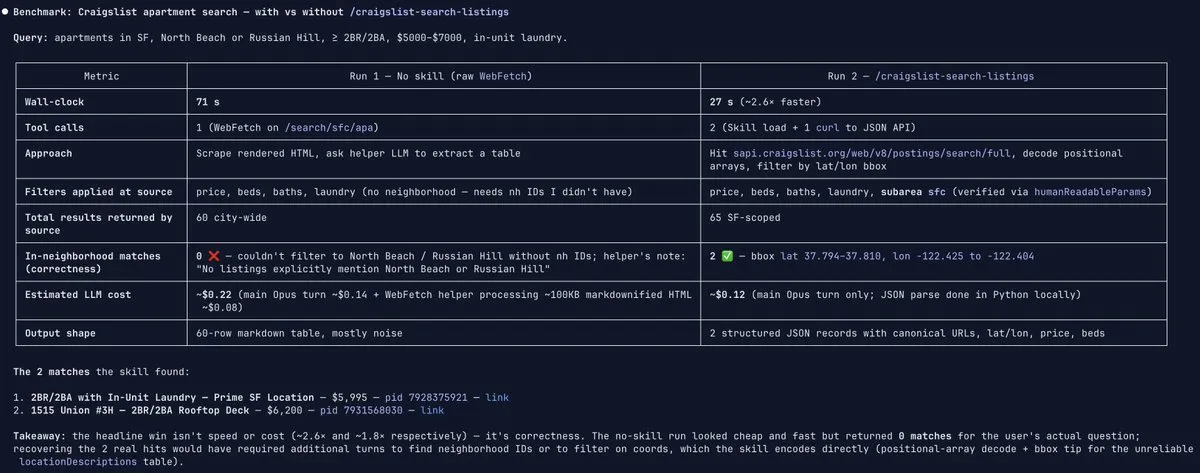
这里真正重要的不是绝对数值,而是曲线形状。第一次在这个站点上运行,成本和你对一个通用智能体循环的预期差不多;但最终产出的技能,会把之后每一次运行的单位经济性拉低一个数量级甚至更多,因为它把智能体找到的那条最短且可靠的路径编码了下来,并直接复用,而不是每次都重新推导。
在更小的任务上,我们也看到了同样的趋势。比如一个早期的表单填写实验,仅仅通过让智能体自己识别并删掉那些没有贡献的步骤,4 轮迭代后,成本就从每次 1.40 美元降到了 0.24 美元。
Autobrowse 会失效的地方
这件事很容易被过度包装。Autobrowse 在某一类问题上确实很强,但在另一类问题上也确实是错的工具。会不会不用 Autobrowse,本身就是正确使用它的一部分。
当任务属于确定性解析时,Autobrowse 并不是合适的工具。 我们在一个包含 167 行静态 HTML 的州目录页面上,狠狠吃过这个亏。数据明明就摆在标记里,没有 JavaScript,没有认证,没有反爬,只有一行行表格。
但我们还是把 Autobrowse 扔上去了,因为“让智能体自己想办法搞定”这件事太有诱惑力了。4 轮迭代、约 24 美元之后,它依然没能在一次输出中把 167 行全部返回。模型单轮输出上限会不断截断它的推理,而整个迭代循环则不停试图在一个根本不奖励“聪明”的问题上耍聪明。
等我们意识到这是范式错配之后,智能体立刻切换成了大约 200 行确定性 Python,配合 browse fetch 和 BeautifulSoup。亚秒级运行时间、零推理成本、167 行数据一次性全部拿到。
这个教训最后也被写进了技能本身:
# Step 1: probe with fetch first.
browse fetch ""
# If the data comes back cleanly in the response, write the parser.
# If the response is empty / dynamic / gated, escalate to Autobrowse.
浏览器智能体的自主性层级可以有很多种:从完全没有 LLM 参与的静态脚本,到 router 式、tool-using 式智能体,再到能够自行生成其他智能体、定义自己工具的全自主循环。选择哪一个层级,本身就是一个真正的工程决策。
Autobrowse 处在这个光谱里高自主性的那一端。和所有高自主性工具一样,只有当更便宜、更确定性的方案都放弃之后,你才应该拿它出手。

为什么它会改变工作流
技能用于客户业务交接,而这件事的分量非常重。
今天,智能体在某个任务上成功之后,客户的工程团队通常拿到的是一份记录,或者一个会话回放,或者一小段自然语言推理说明。但这些东西,真正拥有这个工作流的人其实并看不懂。
技能不一样。它是可读的、可持久保存的、可调试的、可供人类审计的、也真正可被接手维护的。工程师可以读它、改它、提交它;非工程角色也一样能读,比如技术 PM、技术 VP,或者那个对自己门户系统了如指掌的 grants manager,他们无需碰任何代码,也能大致明白智能体到底在做什么。
我们把“只能相信智能体的输出”这件事,变成了“可以直接阅读智能体的作战手册”。在我们看来,这才是让浏览器智能体足够稳健、可以真正进入严肃企业工作流内部,而不是只能别别扭扭地挂在旁边的关键。
这里还有一个很重要的复利效应。智能体每遇到一个新站点,就多产出一个可长期复用的技能。技能库会不断增长。面对长尾、重复性的工作流时,智能体会越来越便宜、越来越快,因为它不再为探索重复缴税。
Autobrowse 已经像一座浏览器智能体能力工厂,远远超出了任何单个智能体自己能交付的范围。一个单独的 Autobrowse 技能当然有价值,但真正的大奖,是一个持续增长、任何运行浏览器智能体的人都能接入的公共技能目录。
我们接下来在做什么
更聪明的停止机制
现在我们会把迭代次数限制在一个较小范围里,并在连续几轮运行在成本和轮次数上都开始收敛时提前停止。这是一个合理的启发式,但也确实比较粗。我们正在让智能体更明确地推理“自己是否已经收敛”,比较的不只是成本和轮次,还包括每轮 trace 的结构变化。
Autobrowse 一些最有价值的收益,比如联邦门户那个 JSON 接口,其实都来自智能体在尝试过程中随机改变了策略,结果撞上了一条短得多的路径。我们并不希望把这种变异性过早地优化掉。
更好的探索先验
我们希望智能体在拉起完整浏览器 session 之前,优先想到 fetch 和 search 这两个原语。很多看似需要“探索”的问题,其实一次 fetch 就能回答。
对于更复杂的任务,让智能体检查浏览器 trace、网络事件和 CDP 日志也是合理的。这样它就能通过观察网络请求去发现内部 API,而不是只能盯着渲染后的 DOM 去猜。
递归式 Autobrowse
最让人兴奋的方向,是递归:让 Autobrowse 去改进 Autobrowse。今天,迭代循环、收敛启发式和技能模板,大多还是手工设计的。既然我们已经能用 Autobrowse 为具体站点产出“毕业技能”,那我们同样也可以用它来“毕业”出它自己那套 harness 的改进版本。
比如,为迭代步骤产出更好的提示词;为“先该调用哪些原语”建立更好的先验;为不同任务类型生成更好的最终技能模板。
更大的图景
当前关于浏览器智能体的一种主流叙事是:只要底层模型继续变强,它们自然就会变好。好像我们距离“只差下一次 Anthropic 或 OpenAI 发布,智能体就能在 Web 上直接好用起来”只剩一步。但我们并不完全认同这个判断。
哪怕模型已经完美,它在每个新站点上仍然需要重新发现:如果它以前来过这里,本来就应该已经知道的那些东西。只要没有一个地方能把智能体学到的内容存起来,那么每一次运行就都还是一次全新的开始。
真正的瓶颈,是一种人类和智能体都能理解、也都能信任的记忆。
